JSON Schema in Practice: Validate Before Processing
JSON Schema doesn't validate whether JSON is well-formed — it validates whether it follows the contract you defined. How to implement input validation in Node.js and Python, and why additionalProperties: false matters.
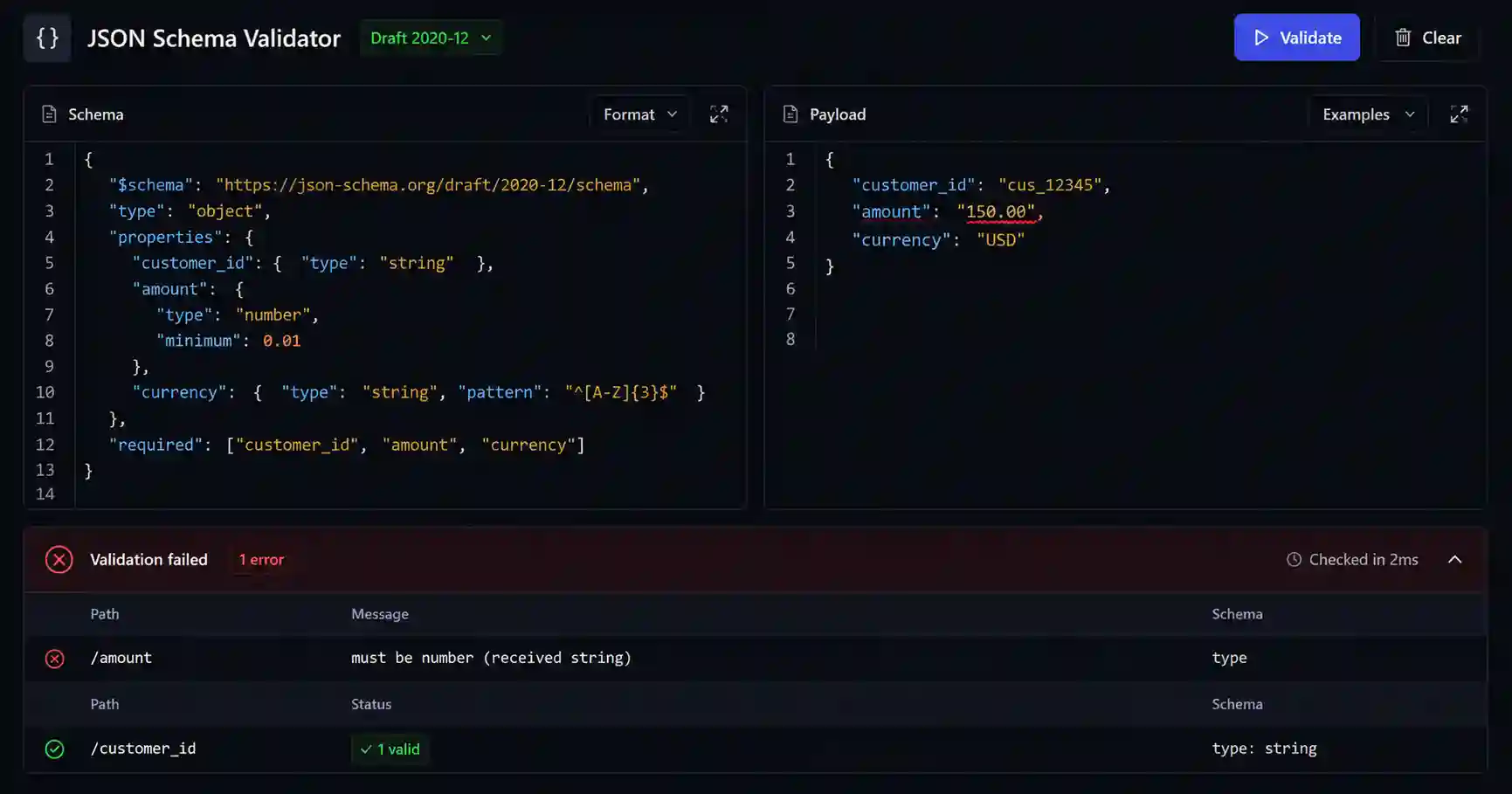
I got a production bug that took two hours to trace. An amount field arriving as the string "150.00" instead of a number — the database accepted it, the ORM didn't complain, but the discount calculation silently returned zero. The payload was syntactically valid JSON. The problem was structural.
JSON Schema solves exactly this: it doesn't validate whether the JSON is well-formed, but whether it respects the contract you defined. This post covers what you need to know to implement input validation in practice — no "what is JSON" tutorial, straight to what works in production.
The problem JSON Schema solves
Every API that receives data from outside has an implicit contract: "I expect an object with these fields, these types, these restrictions." In most implementations this contract lives only in the head of the dev who wrote the endpoint — or, at best, in a comment above the function.
When the contract isn't validated explicitly at the input, invalid data travels through the system until it breaks somewhere unexpected. If you're lucky, it breaks with an exception. If not, it persists silently and appears as corrupted data weeks later.
JSON Schema externalizes this contract in a structure readable by both machine and human. Validation happens before business logic — at the edge of the request, not in the middle of processing.
The keywords that cover 90% of cases
You don't need to master the entire specification. These are the ones that will appear in every schema you write:
type — defines the expected type: "string", "number", "integer", "boolean", "array", "object", "null". Without this, any value passes.
properties — describes the fields of an object and the schemas for each one.
required — array with the names of required fields. Fields not listed here are optional by default.
additionalProperties — controls whether fields not declared in properties are allowed. The default value is true — meaning by default you accept any extra field that arrives in the payload. Setting it to false is an important defensive measure.
enum — list of allowed values. Useful for status, type, category fields.
format — semantic validation: "email", "date", "date-time", "uri", "uuid". Caution: format is not validated by default in all implementations — in ajv you need ajv-formats.
minimum / maximum, minLength / maxLength, pattern — numeric and string restrictions.
A real schema: validating an order
{
  "$schema": "https://json-schema.org/draft-07/schema#",
  "type": "object",
  "properties": {
    "customer_id": {
      "type": "string",
      "format": "uuid"
    },
    "amount": {
      "type": "number",
      "minimum": 0.01
    },
    "currency": {
      "type": "string",
      "enum": ["USD", "EUR", "GBP"]
    },
    "items": {
      "type": "array",
      "minItems": 1,
      "items": {
        "type": "object",
        "properties": {
          "product_id": { "type": "string" },
          "quantity": { "type": "integer", "minimum": 1 }
        },
        "required": ["product_id", "quantity"],
        "additionalProperties": false
      }
    }
  },
  "required": ["customer_id", "amount", "currency", "items"],
  "additionalProperties": false
}
This schema rejects amount: "150.00" (string instead of number), rejects currency: "JPY" (outside the enum), rejects items without product_id, and rejects any unknown field at the root level of the object.
Implementing in Node.js with ajv
Ajv is the reference implementation for JavaScript — faster and more spec-adherent than the alternatives.
import Ajv from 'ajv'
import addFormats from 'ajv-formats'

const ajv = new Ajv({ allErrors: true })
addFormats(ajv)

// Compile ONCE, outside the handler
const validateOrder = ajv.compile(orderSchema)

// Inside the handler
function createOrder(req, res) {
  const valid = validateOrder(req.body)
  if (!valid) {
    return res.status(400).json({
      error: 'invalid_payload',
      details: validateOrder.errors
    })
  }
  // process here — req.body is already validated
}
The critical point: ajv.compile(schema) is an expensive operation. If you call it inside the handler, you recompile on every request. The cost is real — benchmarks show 50x lower throughput. Compile once at module scope and reuse the returned function.
allErrors: true makes ajv continue validating after the first error — the client receives all problems at once instead of fixing them one by one.
Implementing in Python with jsonschema
from jsonschema import validate, ValidationError, Draft7Validator

validator = Draft7Validator(order_schema)

def create_order(payload: dict):
    errors = list(validator.iter_errors(payload))
    if errors:
        raise ValidationError(
            message="invalid_payload",
            context=errors
        )
    # process here
iter_errors returns all errors at once — same behavior as allErrors: true in ajv. Draft7Validator compiled once outside the function, same performance reasoning.
additionalProperties: false — the keyword most people forget
By default, JSON Schema silently accepts extra fields. A payload with { "amount": 100, "admin": true } passes a schema without additionalProperties: false. Depending on your ORM or mapper, this extra field may be ignored or, in less secure implementations, processed.
Setting additionalProperties: false on all objects in the schema is a defensive posture: you explicitly declare the contract and any field outside it is rejected. This also makes API evolution easier — when you add a new field, you add it to the schema first, not discover it was arriving silently.
What JSON Schema doesn't validate
JSON Schema validates structure and type. It doesn't validate:
- Business uniqueness:
customer_idmay be a valid UUID but not exist in the database - Cross-field consistency:
start_datemay be afterend_date— you need custom logic for this - Authentication and authorization: who sent the payload, not what's inside it
- Complex conditional logic: you can model with
if/then/else, but it becomes fragile for real business rules
The rule is: JSON Schema handles the envelope. Business logic handles the content. Both together, in that order.
Validate at the edge, trust the interior
The separation that works in production is simple: validate at the input, don't distribute validation across the system. If data passed schema validation at the request edge, the rest of the code can assume the structure is correct — without if payload.get('amount') is not None scattered throughout the handler.
This isn't just organization. It's an explicit contract between what enters the system and what the system processes. The amount-as-string bug I mentioned at the beginning wouldn't have reached the database if the schema was in place. Two hours of debugging that didn't need to exist.
Note: the editorial content ends here. What follows is a recommendation for a tool related to the post's topic.
Related tool
To test and iterate a schema before integrating in code, use the JSON Schema Validator — paste the schema and the payload, and see the errors with exact path and readable message. Especially useful when the schema has $ref or nested structures and you need to confirm that validation is catching what you expect.
- 01 UTF-8 and encoding problems: why accents break and how to fix them What UTF-8 is, code points, mojibake, and why accented text turns to garbage — the mechanism explained end to end.
- 02 MIT, Apache, and GPL Licenses: Practical Differences for Developers MIT, Apache 2.0, and GPL are not the same thing. Understand permissive vs copyleft, patent protection, and compatibility before shipping code to production.